HardFOC board HAL
Flux V1 HAL
The software layer for the HardFOC Flux V1 valve control board. One Flux object gives your ESP32-S3 application
eight solenoid valve channels, six proportional valve channels, analog inputs, temperatures, CAN, storage and a
status LED, through a small set of managers that know the board's wiring.
This repository (hf-hal-flux-v1) turns the board into C++ objects. Your application does not touch GPIO numbers
or SPI frames; it calls flux.valves, flux.adc, flux.temp.
- MCU
- ESP32-S3, dual core; ESP-IDF release/v5.5
- Valve drivers
- MAX22200: 8 on/off solenoid channels (hit and hold) · TLE92466ED: 6 proportional channels (regulated current, PWM, dither); one SPI bus, 1 MHz
- Analog inputs
- ADS7952: 12 channels, 12 bit, 2.5 V reference, own SPI bus at 4 MHz · ESP32 ADC1: NTC thermistor and supply voltage
- Communication
- CAN 500 kbit/s (TWAI) · UART for a PyroScience FDO2 oxygen probe · USB Serial/JTAG (console, flashing)
- Power
- 24 V valve supply, needed only to drive valves; the board starts and logs from USB without it
- Status
- One WS2812 RGB LED
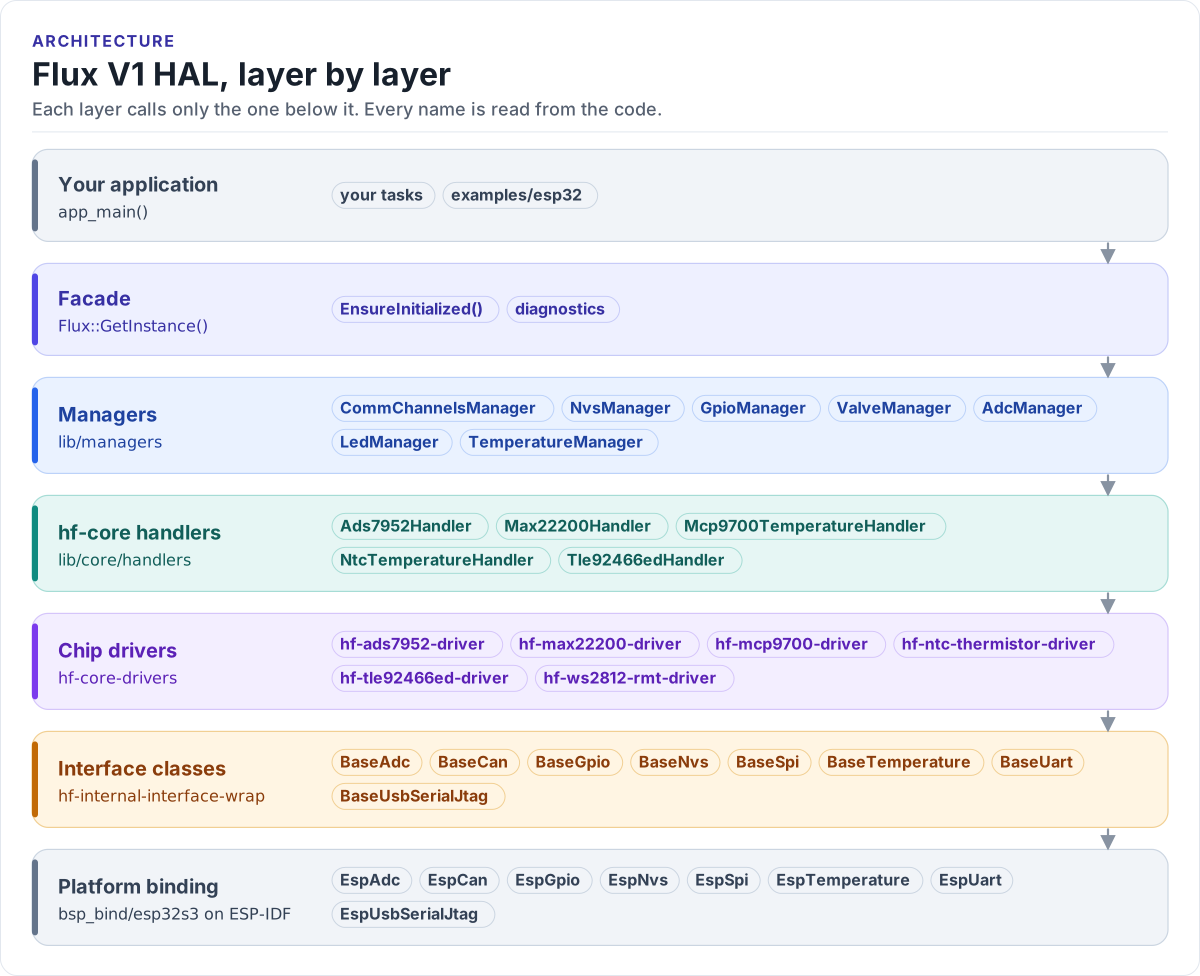
Figure description and sources
From top to bottom, each layer only calls the one under it. Your application asks the facade singleton for the managers. The managers (one per board function) own the hf-core handlers, which wrap one chip driver each. The managers are MCU-free: the platform binding of the MCU family (bsp_bind/esp32s3 on this board) creates the objects behind the interface classes, the ESP32 implementations that sit on ESP-IDF, and is the only HAL code that includes ESP-IDF. Drivers talk to hardware only through the interface classes. Every name in a band is read from the code: the managers from the facade's member references, the handlers, drivers and interface classes from the managers', handlers' and binding's #include lines.
Drawn from: lib/api/Flux.h Flux (manager references); lib/managers #includes; lib/core/handlers #includes; lib/managers/bsp_bind #includes; figure module docs/diagrams/figures/hal-layers.py.
What you get
- One
Fluxobject that brings the board up in a fixed order and reports what failed (Initialisation). - One manager per board function: valves, ADC, temperature, GPIO, LED, communication, storage (Managers).
- Valve channels by name (
ValveChannel::SOL_CH0,PROP_CH0), whichever chip drives them (ValveManager). - A pin map generated from the board's pin header, so the pages cannot disagree with the firmware (Pin map).
- Diagnostics for every manager:
GetLastError(), health snapshots,DumpSystemStatistics()(Errors and diagnostics). - Example apps for each manager, built by CI on every pull request (Examples).
Where to go next
-
Install ESP-IDF, clone with submodules, build, flash and watch the first example.
-
The first power-up, step by step, and what each start-up warning means.
-
Buses, chips and the pin map, generated from the board's pin header.
-
Layers, start-up order, ownership, threading and errors.
-
One page per manager: what it does, its API, an example and its pitfalls.
-
Every buildable app, generated from
app_config.yml.