Figures
Every figure on this site is drawn by a Python module from facts extracted from the code, so it is rebuilt,
not redrawn, when the code changes. CI runs hardfoc-docs figures --check and fails when a
committed figure no longer matches the code. Each figure below lists the files it is drawn from.
Flux V1: buses and chips
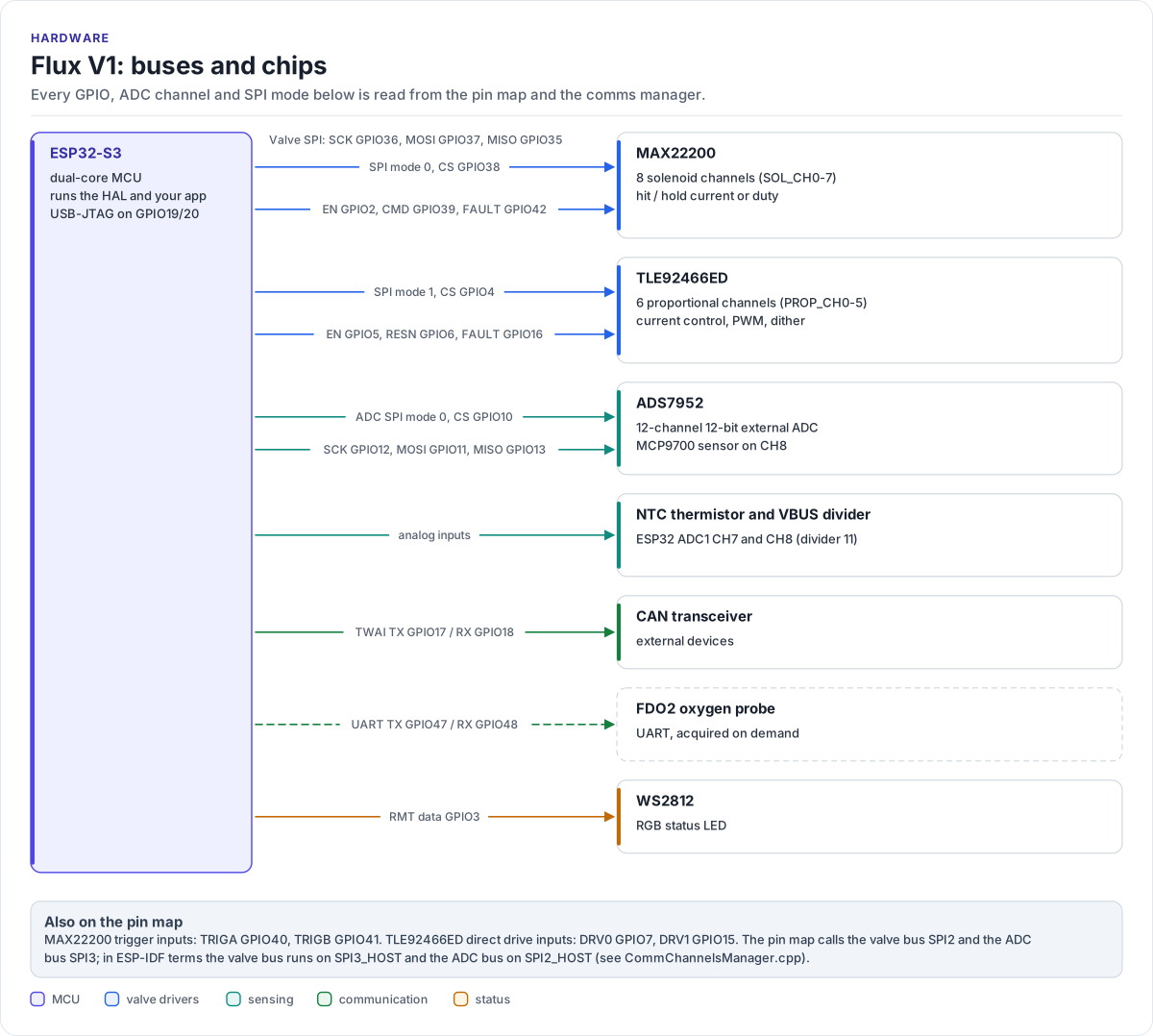
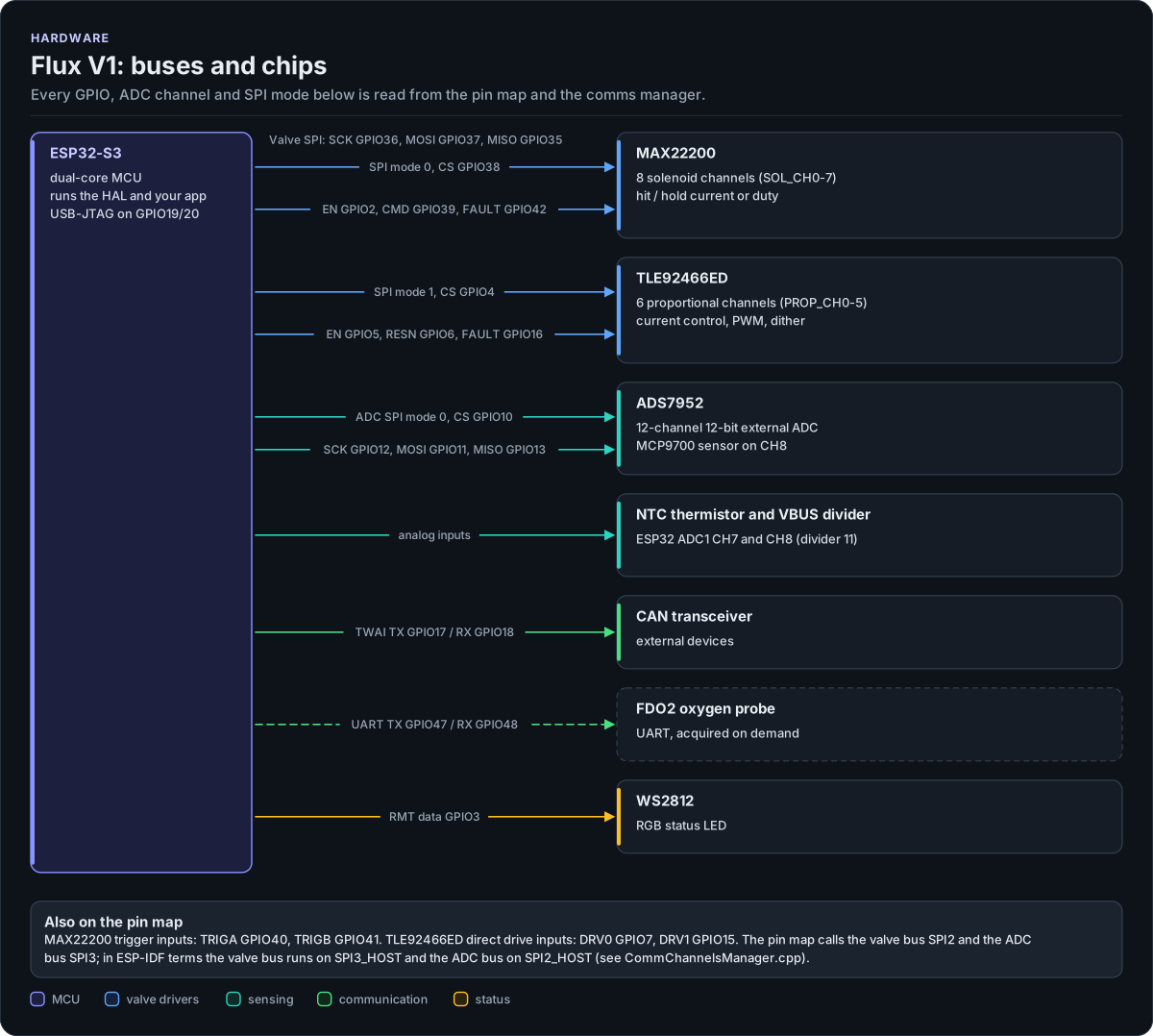
Figure description and sources
The ESP32-S3 on the left runs all the software. Each arrow to the right is one bus or signal, labelled with the GPIOs it uses. One SPI bus is shared by the two valve drivers: the MAX22200 (eight solenoid channels) and the TLE92466ED (six proportional, current-controlled channels), each with its own chip select and its own control and fault lines. A second SPI bus is dedicated to the ADS7952 12-channel external ADC. The ESP32-S3's own ADC reads the NTC thermistor and the bus-voltage divider. TWAI goes to the CAN transceiver, a UART is reserved for the FDO2 oxygen probe, and one data line drives the WS2812 status LED. The layout is drawn by hand; every GPIO number, ADC channel, chip select and SPI mode is read from the functional pin map and the comms manager, so a pin change rebuilds this figure.
Drawn from: lib/core/hf-core-drivers/internal/hf-pincfg/src/hf_functional_pin_config_flux_v1.hpp HF_FUNCTIONAL_GPIO_PIN_LIST; lib/core/hf-core-drivers/internal/hf-pincfg/src/hf_functional_pin_config_flux_v1.hpp HF_FUNCTIONAL_ADC_CHANNEL_LIST; lib/managers/CommChannelsManager.h SpiDeviceId; figure module docs/diagrams/figures/board-overview.py.
Figure module: docs/diagrams/figures/board-overview.py
Drawn from:
HF_FUNCTIONAL_GPIO_PIN_LISTinlib/core/hf-core-drivers/internal/hf-pincfg/src/hf_functional_pin_config_flux_v1.hppHF_FUNCTIONAL_ADC_CHANNEL_LISTinlib/core/hf-core-drivers/internal/hf-pincfg/src/hf_functional_pin_config_flux_v1.hppSpiDeviceIdinlib/managers/CommChannelsManager.h
Flux V1 HAL, layer by layer
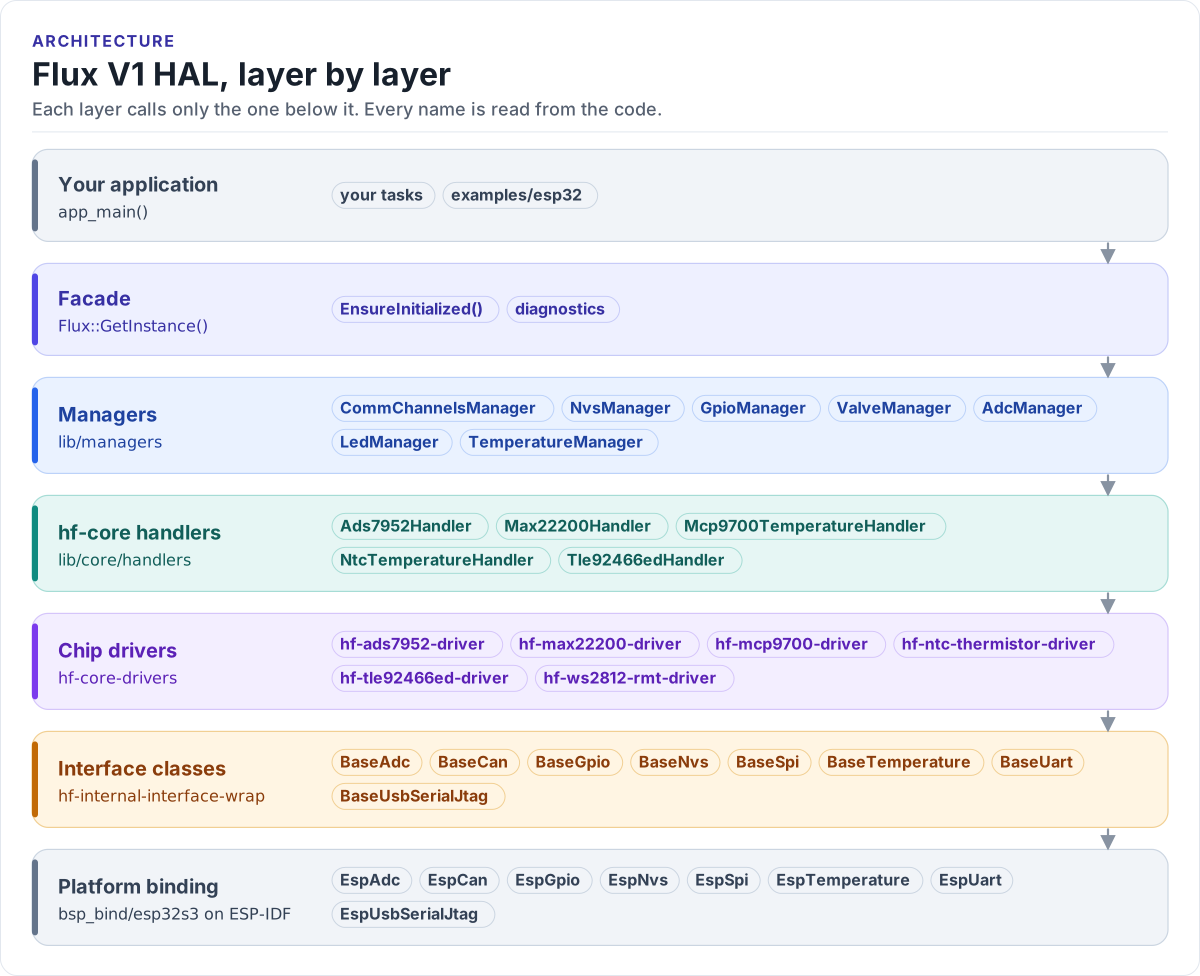
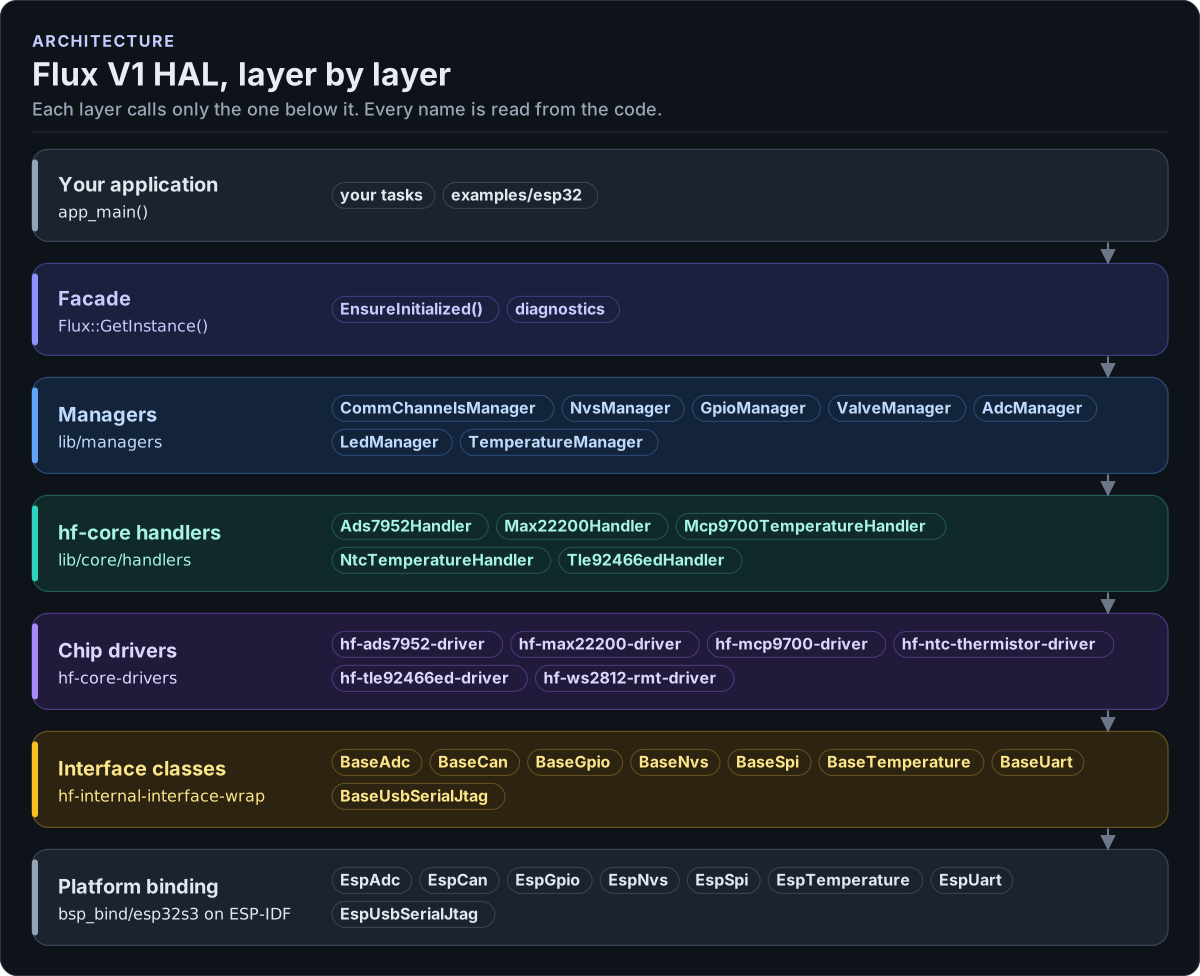
Figure description and sources
From top to bottom, each layer only calls the one under it. Your application asks the facade singleton for the managers. The managers (one per board function) own the hf-core handlers, which wrap one chip driver each. The managers are MCU-free: the platform binding of the MCU family (bsp_bind/esp32s3 on this board) creates the objects behind the interface classes, the ESP32 implementations that sit on ESP-IDF, and is the only HAL code that includes ESP-IDF. Drivers talk to hardware only through the interface classes. Every name in a band is read from the code: the managers from the facade's member references, the handlers, drivers and interface classes from the managers', handlers' and binding's #include lines.
Drawn from: lib/api/Flux.h Flux (manager references); lib/managers #includes; lib/core/handlers #includes; lib/managers/bsp_bind #includes; figure module docs/diagrams/figures/hal-layers.py.
Figure module: docs/diagrams/figures/hal-layers.py
Drawn from:
Flux (manager references)inlib/api/Flux.h#includesinlib/managers#includesinlib/core/handlers#includesinlib/managers/bsp_bind
Flux::EnsureInitialized()
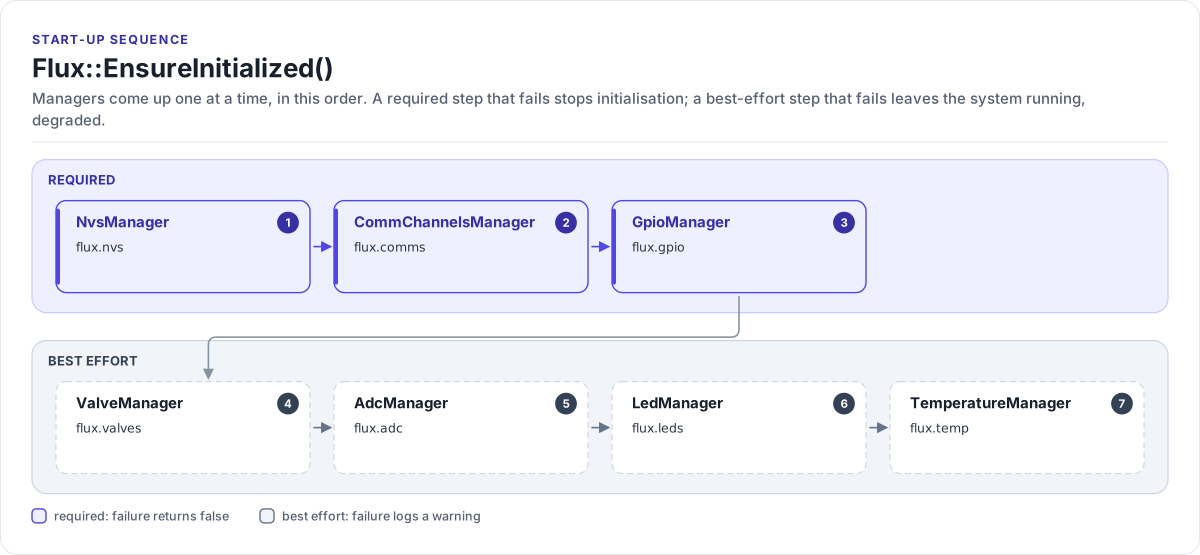
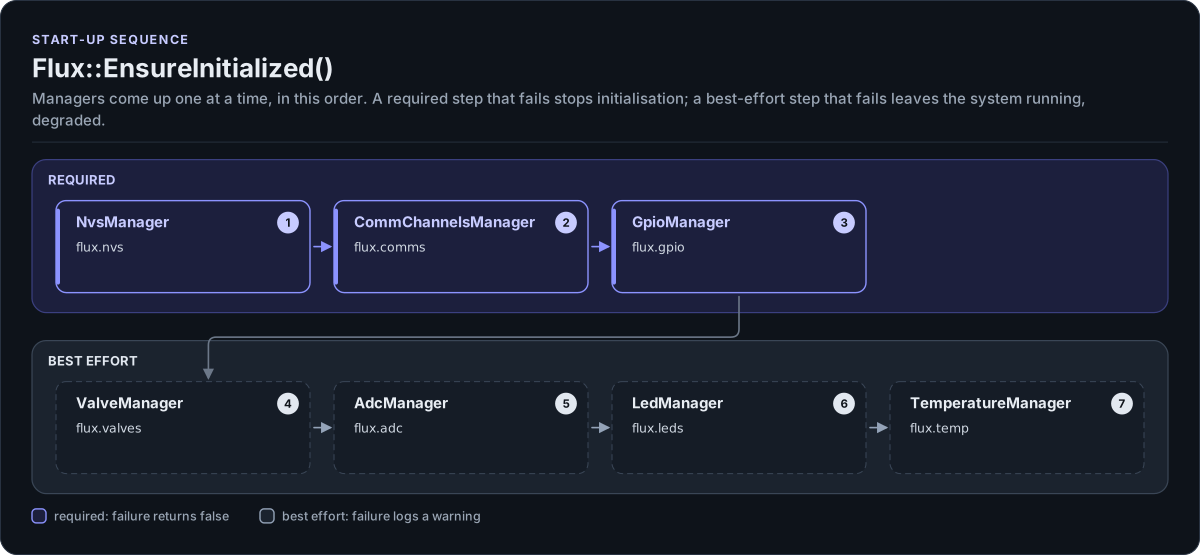
Figure description and sources
Left to right, then the second row. The facade initialises the managers one at a time, in the order of the calls in its init function. The first group is required: if any of them fails, EnsureInitialized() returns false and the application should not continue. The second group is best effort: a failure there is logged as a warning, the manager stays unavailable and the system reports itself as degraded, so a bench with only some chips fitted still comes up. The order and the required / best-effort split are read from the init function, which returns false only in the required branches.
Drawn from: lib/api/Flux.cpp Flux::InitializeAllComponents; figure module docs/diagrams/figures/init-order.py.
Figure module: docs/diagrams/figures/init-order.py
Drawn from:
Flux::InitializeAllComponentsinlib/api/Flux.cpp
Managers, handlers and drivers
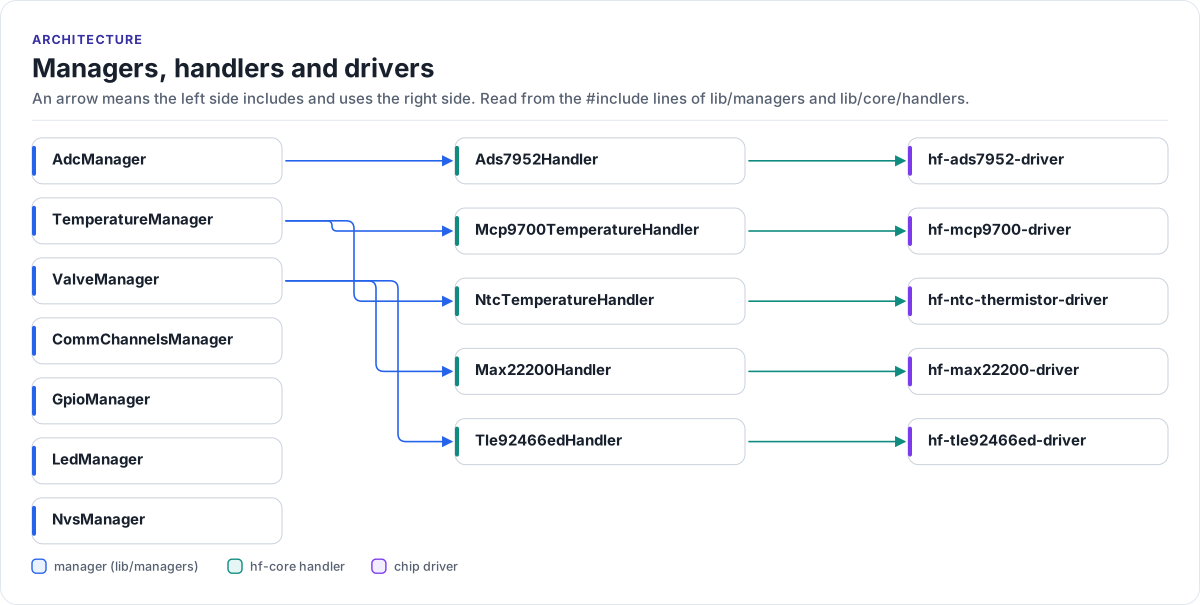
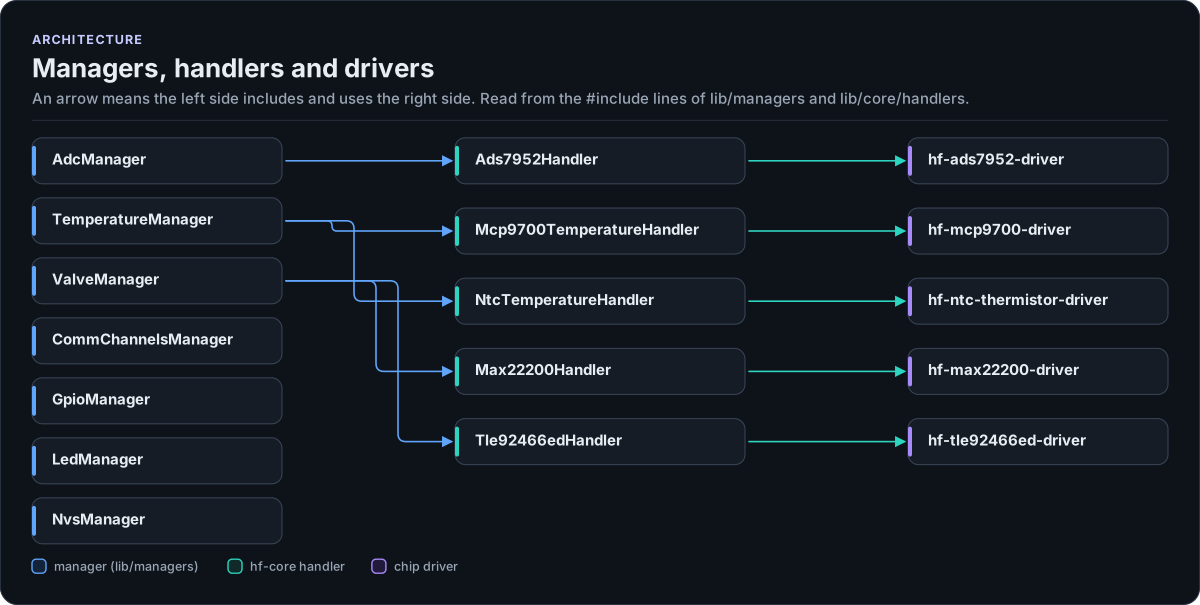
Figure description and sources
Managers on the left, hf-core handlers in the middle, chip drivers on the right. An arrow means "includes and uses": a manager owns the handler it points at, and each handler wraps exactly one driver. ValveManager owns both valve drivers (MAX22200 for the solenoid channels, TLE92466ED for the proportional channels), AdcManager owns the ADS7952 external ADC, and TemperatureManager owns the NTC and MCP9700 sensor handlers. Managers with no arrow (communication buses, GPIO, NVS, the status LED) get their objects from the platform binding and talk to them through the interface classes only.
Drawn from: lib/managers #includes; lib/core/handlers #includes; figure module docs/diagrams/figures/manager-dependencies.py.
Figure module: docs/diagrams/figures/manager-dependencies.py
Drawn from:
#includesinlib/managers#includesinlib/core/handlers