Figures
Every figure on this site is drawn by a Python module from facts extracted from the code, so it is rebuilt,
not redrawn, when the code changes. CI runs hardfoc-docs figures --check and fails when a
committed figure no longer matches the code. Each figure below lists the files it is drawn from.
From pixels to pulses, on ESP-IDF
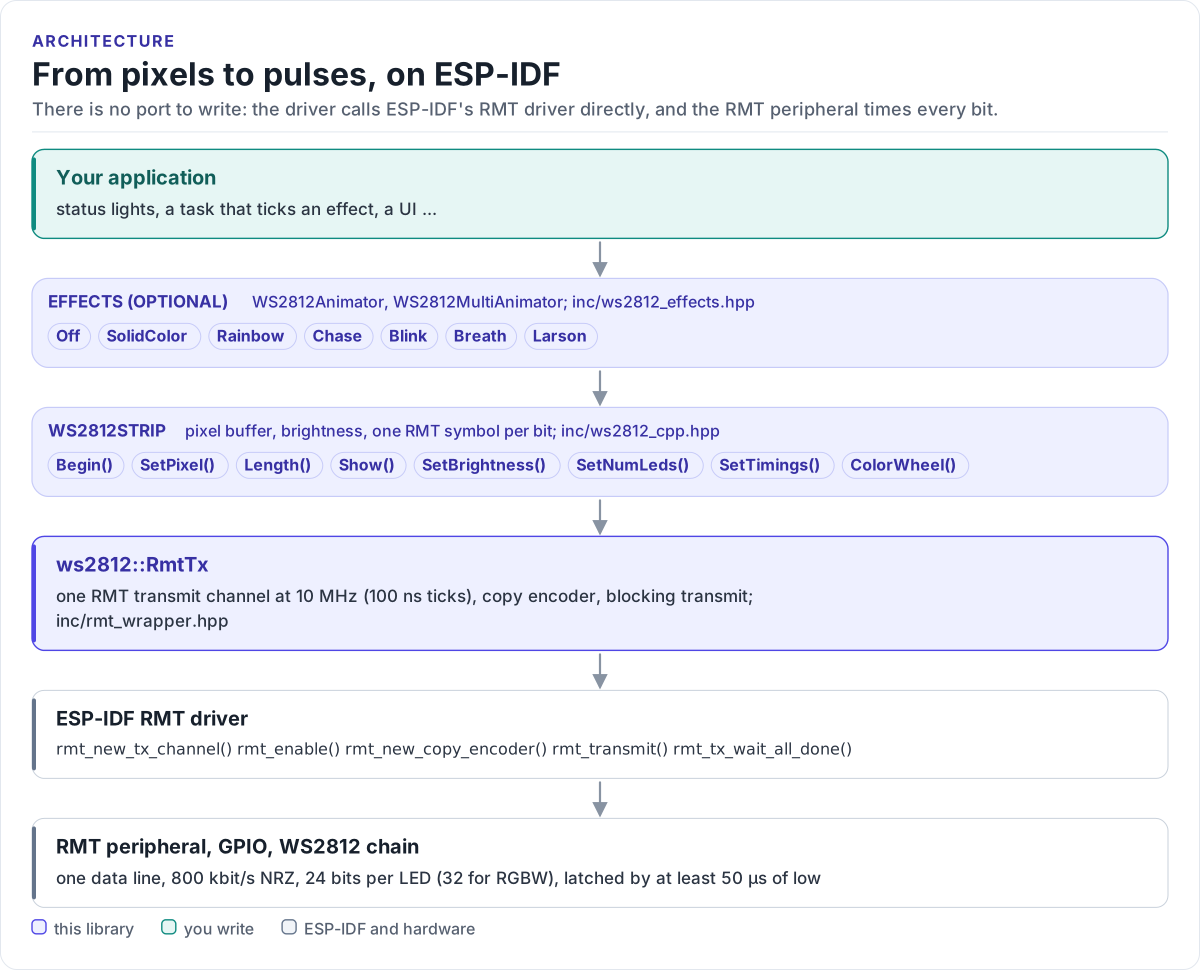
Figure description and sources
From top to bottom. Your application, the only code you write, either runs an effect or sets pixels itself. The effects (WS2812Animator and WS2812MultiAnimator, the Effect values listed from inc/ws2812_effects.hpp) draw into a WS2812Strip. The strip (inc/ws2812_cpp.hpp, public methods listed) keeps the pixel buffer, applies the brightness and turns every bit into one RMT symbol with the configured high and low times. ws2812::RmtTx (inc/rmt_wrapper.hpp) owns one RMT transmit channel at 10 MHz and sends the symbols, blocking until they are out. Below it is ESP-IDF's RMT driver (the calls listed from rmt_wrapper.hpp) and the RMT peripheral, which times the pulses on the GPIO that feeds the first LED.
Drawn from: inc/ws2812_effects.hpp WS2812Animator::Effect; inc/ws2812_cpp.hpp WS2812Strip; inc/rmt_wrapper.hpp ws2812::RmtTx; figure module docs/diagrams/figures/driver-layers.py.
Figure module: docs/diagrams/figures/driver-layers.py
Drawn from:
WS2812Animator::Effectininc/ws2812_effects.hppWS2812Stripininc/ws2812_cpp.hppws2812::RmtTxininc/rmt_wrapper.hpp