Architecture
How the driver is put together: three layers, what each owns, and how one call reaches the display.
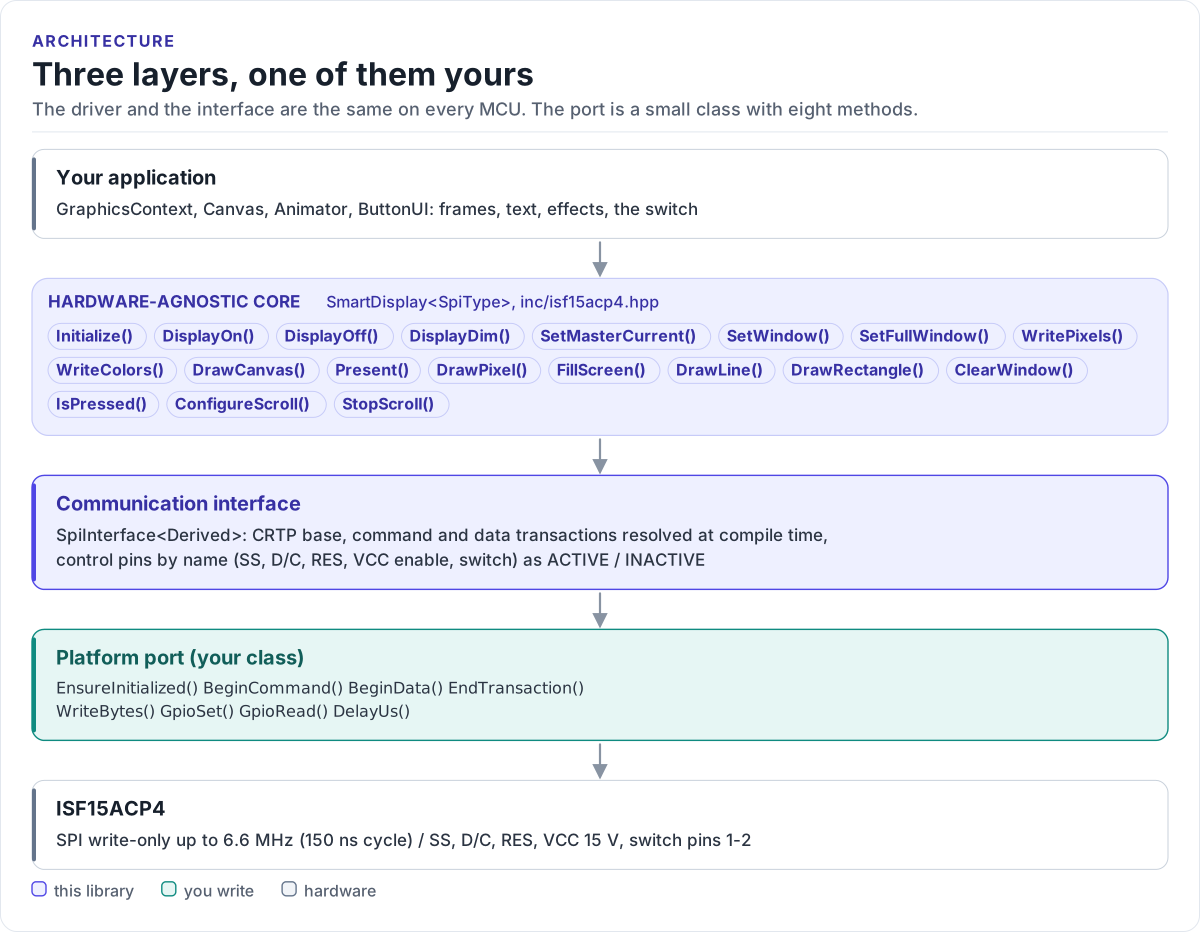
Figure description and sources
From top to bottom. Your application draws into a GraphicsContext and calls one SmartDisplay
Drawn from: inc/isf15acp4.hpp SmartDisplay public calls; inc/isf15acp4_spi_interface.hpp SpiInterface; figure module docs/diagrams/figures/driver-layers.py.
The three layers
| Layer | What | You change it |
|---|---|---|
| Hardware-agnostic core | SmartDisplay<SpiType> and the graphics, animation and button helpers |
Never |
| Communication interface | SpiInterface<Derived> |
Never |
| Platform port | Your class | Once per MCU or board (Porting) |
Everything above the port is the same on ESP32, STM32, a Linux host or the unit-test port. That is how the host tests run the real driver code without hardware.
How one call reaches the display
sequenceDiagram
    participant A as Application
    participant G as GraphicsContext
    participant D as SmartDisplay
    participant P as Your port
    A->>G: DrawString(4, 4, "READY", Green)
    G->>G: 5 x 7 glyphs into the RGB565 canvas
    A->>D: Present(gfx)
    D->>P: BeginCommand(), WriteBytes(15h 00h 5Fh), EndTransaction()
    D->>P: BeginCommand(), WriteBytes(75h 00h 3Fh), EndTransaction()
    D->>P: BeginData(), WriteBytes(frame, 12288), EndTransaction()
    P-->>D: true / false
    D-->>A: true / false
The pieces of the core
| Type | Owns |
|---|---|
SmartDisplay |
Reset and supply sequence, init table, windows, frame upload, hardware drawing, scroll, brightness, switch, errors |
GraphicsContext |
The drawing surface, with the backend chosen at construction |
Canvas |
A 96 x 64 RGB565 frame, software drawing, the 5 x 7 font |
Animator |
Frame timing; animations:: holds four built-in effects |
ButtonUI |
Switch debouncing and events, status and gauge drawing |
ssd1331:: |
Command opcodes, init tables, timing constants |
| Types | SmartDisplayConfig, ProductVariant, Error, Rect, Point, Color565, colors:: |
Why CRTP
The interface is a class template parameter, not a virtual base class. The compiler sees your port's methods
directly and inlines them; the driver has no vtable, allocates nothing and needs no RTTI. The cost is that the
driver type names the port: SmartDisplay<MySpi>. Code that works with several port types takes the driver as a
template parameter too.
GraphicsContext uses the same pattern (GraphicsSurface<Derived>) for its drawing calls. Its link back to the
display in hardware-direct mode is a small table of function pointers (DisplayPresenter), so the graphics code
does not depend on your port type.
Memory
Nothing is allocated on the heap. The large objects are the frames:
| Object | Size |
|---|---|
Canvas |
12,288 bytes (96 x 64 x 2), whatever the variant |
GraphicsContext |
One Canvas plus a few bytes, in every backend |
SmartDisplay |
A few dozen bytes; FillScreen() builds a temporary Canvas on the stack |
Keep a GraphicsContext as a static or long-lived object rather than on a small task stack, and give the task that
calls FillScreen() at least 13 KB of stack.
Source map
Headers are in inc/ and their template bodies (.ipp) in src/;
every file name starts with isf15acp4.
| File | Contents |
|---|---|
.hpp, .ipp |
SmartDisplay<SpiType> |
_spi_interface.hpp |
SpiInterface, CtrlPin, GpioSignal |
_graphics_*.hpp, _canvas.hpp |
Graphics backends, the canvas |
_animator.hpp, _button_ui.hpp |
Animation and switch helpers, SmartDisplayConfig |
_font.hpp, _font_data.cpp |
The 5 x 7 font: the one compiled source |
_ssd1331.hpp |
SSD1331 commands, init tables |
_types.hpp |
Types, colours, geometry |
scripts/convert_image_to_rgb565.py converts PNG artwork, tests/ holds the host tests and the compiled
documentation snippets, and examples/esp32/ the ESP-IDF applications.