Architecture
How the driver is put together: three layers, what each owns, and how one call reaches the sensor.
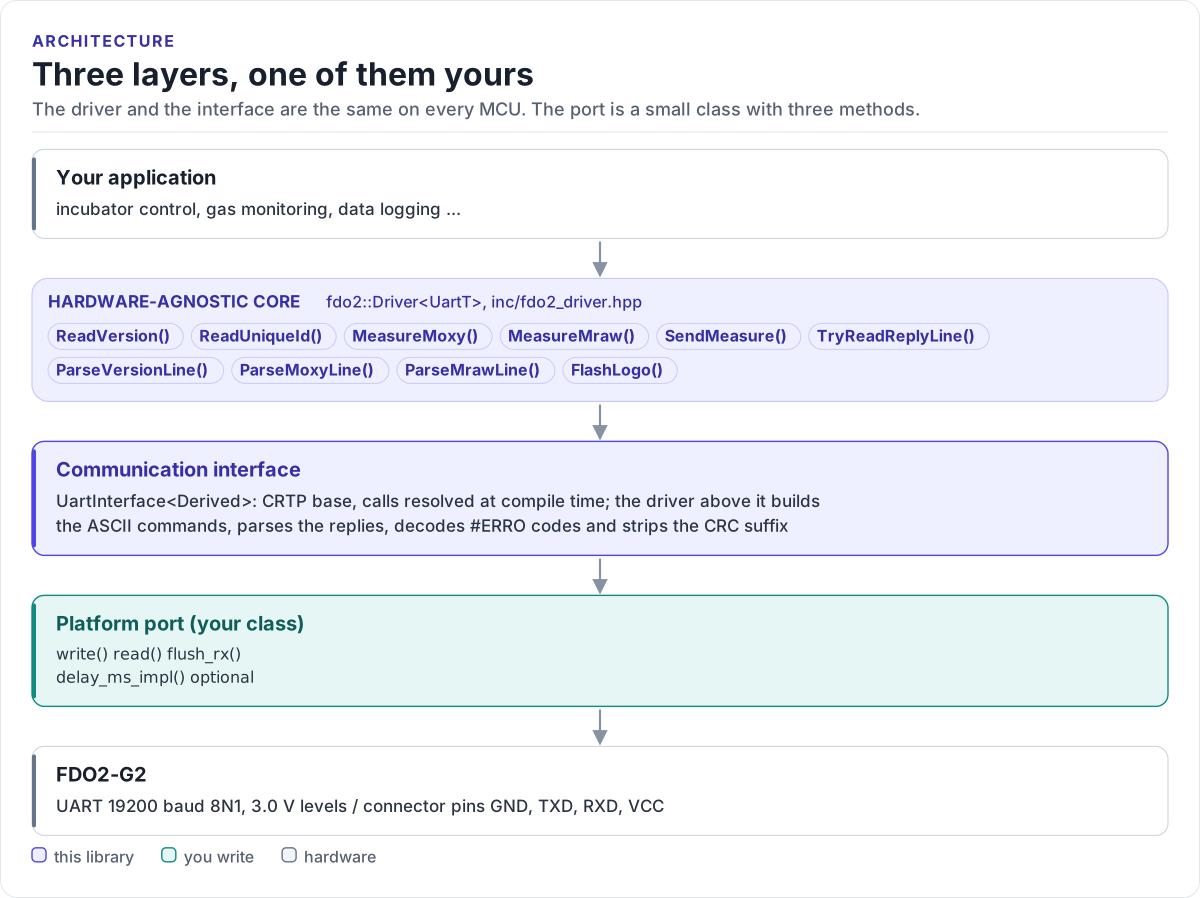
Figure description and sources
From top to bottom. Your application talks to one fdo2::Driver
Drawn from: inc/fdo2_driver.hpp Driver public calls; inc/fdo2_uart_interface.hpp UartInterface; figure module docs/diagrams/figures/driver-layers.py.
The three layers
| Layer | Where | You change it when |
|---|---|---|
Hardware-agnostic core: fdo2::Driver<UartT> |
inc/fdo2_driver.hpp, inc/fdo2_types.hpp |
Never, for a new board |
Communication interface: UartInterface<Derived> |
inc/fdo2_uart_interface.hpp |
Never |
| Platform port: your class, three methods | Your project | Once per MCU or board (Porting) |
Everything above the port is the same on ESP32, STM32, a Linux host or the unit-test model. That is how the host tests run the real driver code without hardware.
How one call reaches the sensor
sequenceDiagram
    participant A as Application
    participant D as Driver
    participant P as Your port
    participant S as FDO2-G2
    A->>D: MeasureMoxy()
    D->>P: flush_rx()
    D->>P: write(MOXY command, CR)
    P->>S: 6 bytes at 19200 baud
    S-->>P: MOXY 203456 17892 0, CR (after up to 150 ms)
    D->>P: read(buf, 511, 250 ms)
    P-->>D: one line, CR included
    D->>D: check and strip CRC suffix, split, check header, field count and every value
    D->>D: ERRO reply: DeviceError, code in LastDeviceErrorCode()
    D-->>A: result with MoxyReading: 203.456 hPa, 17.892 C, status 0
Why CRTP
The interface is a class template parameter, not a virtual base class. The compiler sees your port's methods
directly and inlines them; the driver has no vtable, allocates nothing and needs no RTTI. The cost is that the
driver type names the port: fdo2::Driver<MyUart>. Code that has to work with several port types takes the
driver as a template parameter too.
Results instead of exceptions
Every command returns DriverResult<T>: a value and an error (DriverError). It converts to bool, so
if (!m) reads naturally, and fdo2::ToString(error) names the error for a log. An #ERRO reply from the module
becomes DriverError::DeviceError, with the module's own code kept in LastDeviceErrorCode() until the next
command.
The status word S is not an error to the driver: a measurement with fault bits set still returns
DriverError::None, because the module did answer. Checking S is your job, as the datasheet requires; the
API guide shows how.
Memory and timing
The driver allocates nothing. A call uses under 1 KB of stack: the largest buffer is a 512-byte receive buffer,
then the reply line and its tokens. A call blocks for at most the timeout you set, plus whatever your port's
write() takes.
Source map
| Path | Contents |
|---|---|
inc/fdo2.hpp |
Umbrella header: everything below plus GetDriverVersion() |
inc/fdo2_driver.hpp |
Driver<UartT>: commands, parsing, the split exchange |
inc/fdo2_types.hpp |
DriverResult, DriverError, readings, scaling, status bits, VolumePercentO2() |
inc/fdo2_uart_interface.hpp |
UartInterface<Derived>, the CRTP base of your port |
inc/fdo2_version.h.in |
Version header template, filled in by CMake |
tests/ |
Host unit tests and the compiled documentation snippets |
examples/esp32/ |
ESP-IDF applications and the ESP-IDF port |