HardFOC tools
ESP-IDF Project Tools
Shell and Python scripts that build, flash and monitor every app of a multi-app ESP-IDF project. The apps, ESP-IDF versions, build types and target are written once, in app_config.yml, and the same scripts run on your machine and in CI.
The scripts live inside your project, usually as a submodule at examples/esp32/scripts, next to the
app_config.yml they read. Every HardFOC driver, hf-core and the board HALs use them for their ESP32 examples,
and hf-espidf-ci-tools runs them in GitHub Actions.
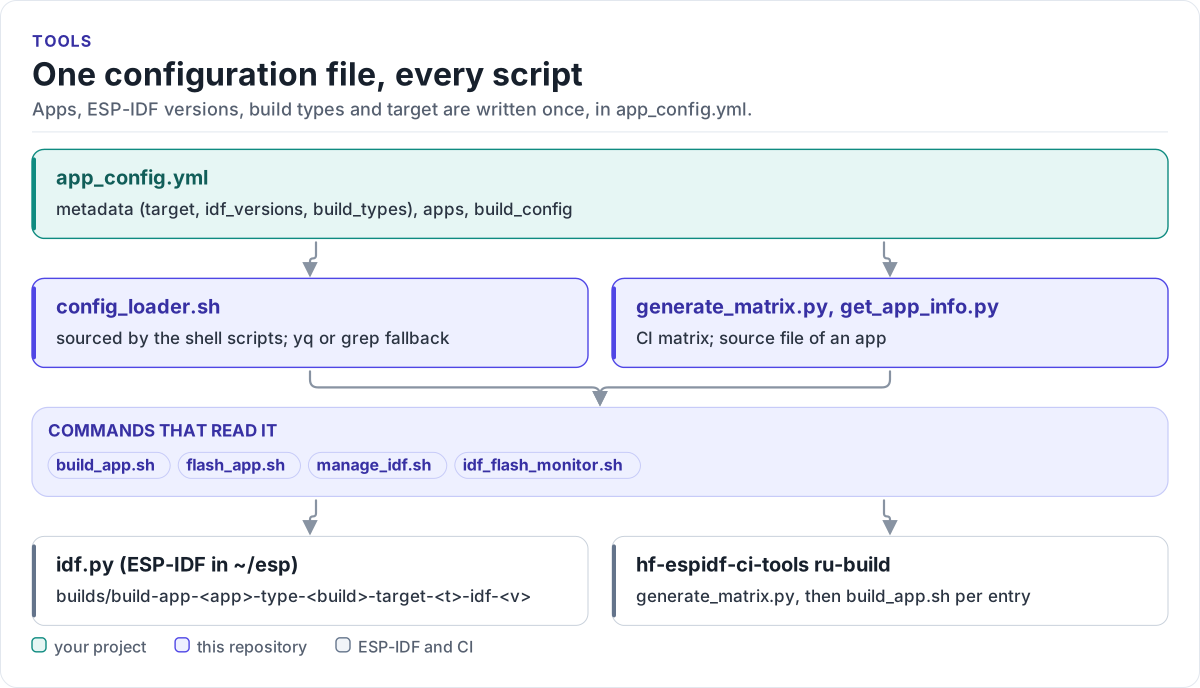
Figure description and sources
From top to bottom. app_config.yml in the ESP-IDF project lists the apps, ESP-IDF versions, build types and target. Two readers parse it: config_loader.sh, which the shell scripts source, and the Python scripts generate_matrix.py and get_app_info.py. The commands that source config_loader.sh (read from the scripts) sit on top of them. build_app.sh drives idf.py and writes one build folder per app, build type, target and ESP-IDF version under builds/. In CI, hf-espidf-ci-tools runs generate_matrix.py and build_app.sh.
Drawn from: build_app.sh source config_loader.sh; flash_app.sh source config_loader.sh; manage_idf.sh source config_loader.sh; idf_flash_monitor.sh source config_loader.sh; figure module docs/diagrams/figures/tool-map.py.
The scripts
| Script | What it does | Page |
|---|---|---|
build_app.sh |
Builds one app for one build type and ESP-IDF version into its own folder under builds/ |
build_app.sh |
flash_app.sh |
Flashes, monitors or sizes an app; builds it first when needed; finds the port; logs the monitor | flash_app.sh |
manage_idf.sh |
Installs, lists, exports and switches ESP-IDF versions under ~/esp |
manage_idf.sh |
config_loader.sh |
Shell functions that read app_config.yml; sourced by the scripts above |
config_loader.sh |
generate_matrix.py |
Turns app_config.yml into a GitHub Actions build matrix |
generate_matrix.py |
get_app_info.py |
Prints an app's source file, the app list, or validates an app name | get_app_info.py |
detect_ports.sh, watch_serial_port.sh, manage_logs.sh |
Find ESP32 serial ports, watch for plug events, read monitor logs | Ports and logs |
setup_repo.sh, setup_basic.sh, setup_common.sh |
Set up a development machine; create a new project | Setting up a machine |
esp32_completion.sh, setup_tab_completion.sh |
Bash completion for build_app.sh and flash_app.sh |
Tab completion |
Where to go next
-
Add the scripts to a project, list one app, build and flash it.
-
Every key, its default and which script reads it.
-
Arguments, build folders, size files and the CMake variables it passes.
-
The matrix and the build in GitHub Actions.